云原生
云:抽象的计算资源(计算资源池: 公有云、私有云、混合云)
云原生的基本思想:
0. 基础架构即代码,GitOps: 云原生中管理的一切对象都用git的方式以源代码的形式管理起来,做到绝对的可追溯。
- 动态环境(云资源一体,不关心是哪来的资源)
- 自动化(声明式API,最终一致性)
- DevOps
- CI/CD(流水线对接云服务)
- ……
kubernetes
云生态的核心组件
Kubernetes(简称K8s)是一个开源的容器编排平台,用于自动化部署、扩展和管理容器化应用程序。
容器技术
- Namespace: 进程隔离
- PID(Process ID)命名空间:隔离进程ID,每个容器可以有自己的进程编号。
- 网络(Network)命名空间:隔离网络接口,容器内的应用看到的只是容器内的网络环境。
- 挂载(Mount)命名空间:隔离文件系统挂载点,每个容器可以有自己的文件系统布局。
- IPC(Inter-Process Communication)命名空间:隔离进程间通信资源,例如信号量和消息队列。
- UTS(Unix Timesharing System)命名空间:隔离主机名和域名,容器可以有自己的主机名。
- 用户(User)命名空间:隔离用户ID和组ID,容器内的root可以与宿主机的root有不同的权限。
- Cgroup:资源管控
- CPU
- 内存
- 硬盘 I/O
- UnionFS:文件系统服务
容器技术解决了哪些问题
1. 环境一致性问题
容器确保了从开发到测试再到生产的环境一致性。这解决了“在我的机器上运行正常”这类问题,因为容器为应用程序提供了一个隔离的、一致的运行环境,包括相同的软件、配置和依赖。
2. 配置管理问题
容器通过将应用程序及其全部依赖打包在一起,简化了配置管理。这意味着开发者不需要在每个环境中重新配置应用程序,可以避免因配置差异导致的错误。
3. 兼容性和依赖问题
通过使用容器,开发者可以打包应用程序所需的库、工具和运行时环境,避免了软件在不同系统环境下运行时可能遇到的兼容性和依赖问题。
4. 快速部署和扩展
容器的轻量级特性使得启动速度非常快,几乎可以实现秒级部署。这对于需要快速扩展的服务尤其重要。容器还支持自动化的部署和扩展,使得管理大规模应用程序变得更加容易。
5. 资源利用和隔离
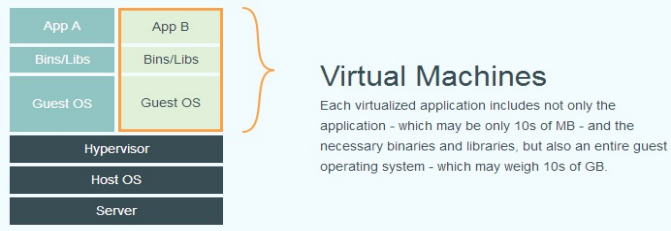
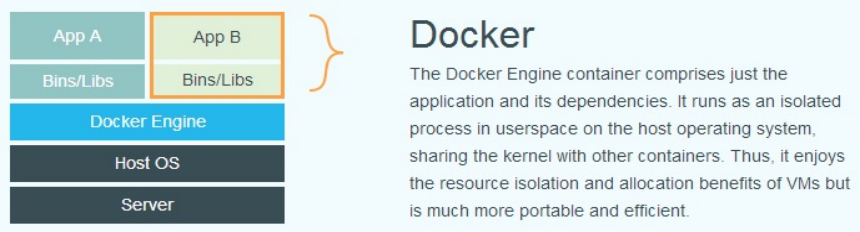
容器在操作系统级别进行资源隔离,使得每个容器都运行在指定的资源限制之内,而不会干扰其他容器。同时,容器共享同一个操作系统核心,与传统的虚拟机相比,能更有效地利用物理资源。
6. 移植性问题
容器技术提高了应用程序的移植性。由于容器在任何支持容器运行时的系统上都能运行,这使得从一个环境迁移到另一个环境(如从物理机到云平台)变得简单和可靠。
7. 持续集成和持续交付(CI/CD)
容器非常适合实现自动化的持续集成和持续交付流程。开发者可以快速构建和回滚应用程序版本,实现高频率的更新和部署,而不影响系统的稳定性。
8. 降低开发与运维(DevOps)的障碍
容器化鼓励采用微服务架构,每个服务可以独立开发、部署和扩展。这降低了团队间的协调复杂性,加速了开发流程,使开发和运维更加紧密地合作。
docker
安装
在 ubuntu 上安装 Docker 运行时,参考 https://docs.docker.com/engine/install/ubuntu/
 1
 2
 3
 4
 5
 6
 7
 8
 9
10
11
12
13
14
| $ sudo apt-get update
$ sudo apt-get install \
apt-transport-https \
ca-certificates \
curl \
gnupg-agent \
software-properties-common
$ curl -fsSL https://download.docker.com/linux/ubuntu/gpg | sudo apt-key add -
$ sudo add-apt-repository \
"deb [arch=amd64] https://download.docker.com/linux/ubuntu \
$(lsb_release -cs) \
stable"
$ sudo apt-get update
$ sudo apt-get install docker-ce docker-ce-cli containerd.io
|
操作
启动:
- docker run
- -it 交互
- -d 后台运行
- -p 端口映射
- -v 磁盘挂载
- 启动已终止容器
- 停止容器
- 查看容器进程
- 查看容器细节:
- docker inspect <containerid>
- 进入容器;
- docker exec -it <containerid> bash
- Docker attach:
- 通过 nsenter
- PID=$(docker inspect –format “{{ .State.Pid }}” <container>)
- $ nsenter –target $PID –mount –uts –ipc –net –pid
- 拷贝文件至容器内:
- docker cp file1 <containerid>:/file-to-path
Demo
代码: main.go
 1
 2
 3
 4
 5
 6
 7
 8
 9
10
11
12
13
14
15
16
17
18
19
20
21
22
23
24
25
26
27
28
29
30
31
32
33
34
35
36
37
38
39
40
41
42
| package main
import (
"fmt"
"os"
"github.com/gin-gonic/gin"
"github.com/thinkeridea/go-extend/exnet"
)
func main() {
r := gin.Default()
r.GET("/healthz", healthHandler)
// listen and serve on 0.0.0.0:8080
if err := r.Run(); err != nil {
panic(err)
}
}
// healthHandler healthcheck实现, curl -v localhost:8080/healthz -H "ttt:yyy"
func healthHandler(c *gin.Context) {
// 遍历request的header并循环写入response header
for k, v := range c.Request.Header {
c.Writer.Header().Set(k, v[0])
}
// 获取环境变量VERSION并写入reponse header
c.Writer.Header().Set("version", os.Getenv("VERSION"))
// 日志记录客户端ip, http返回码, 输出到标准输出
ip := exnet.ClientPublicIP(c.Request)
if ip == "" {
ip = exnet.ClientIP(c.Request)
}
fmt.Printf("客户端ip:%s, http返回码:%d\n", ip, 200)
// 响应healthcheck信息, 状态码为200
c.JSON(200, gin.H{
"message": "pong",
})
}
|
Dockerfile1:
 1
 2
 3
 4
 5
 6
 7
 8
 9
10
11
12
13
14
15
16
17
18
19
20
21
22
| FROM golang:alpine
ENV GO111MODULE=on \
CGO_ENABLED=0 \
GOOS=linux \
GOARCH=amd64 \
GOPROXY="https://goproxy.cn,direct"
WORKDIR /root/ccx
COPY main.go .
RUN go mod init example.com/httpserver
RUN go mod tidy
RUN go build -o httpserver .
WORKDIR /opt/modules/httpserver
RUN mkdir src .
RUN cp /root/ccx/httpserver ./src
EXPOSE 8080
CMD ["/opt/modules/httpserver/src/httpserver"]
|
测试运行:
1
2
3
4
5
| docker build -t ccx/httpserver:v0.0.1 .
docker run -d --name httpserver -p 9090:8080 -e VERSION=v0.0.1 ccx/httpserver:v0.0.1
docker logs -f httpserver
curl -v localhost:9090/healthz -H "ttt:yyy"
|
构建优化:Dockerfile2:
 1
 2
 3
 4
 5
 6
 7
 8
 9
10
11
12
13
14
15
16
17
18
19
20
21
22
23
24
25
26
27
28
29
30
31
32
| # 编译阶段
FROM golang:1.17-alpine AS build
# GO111MODULE=on: 强制开启gomod
# GOPROXY="https://goproxy.cn,direct": 使用国内七牛云包代理
# CGO_ENABLED=0: 关闭cgo,否则在alpine不可运行。
ENV GO111MODULE=on \
CGO_ENABLED=0 \
GOOS=linux \
GOARCH=amd64 \
GOPROXY="https://goproxy.cn,direct"
# 拷贝源码
WORKDIR /go/src/
COPY main.go .
# 预下载依赖 modules 到容器本地 cache
RUN go mod init example.com/httpserver
RUN go mod tidy
# 编译go程序
RUN go build -o /tmp/httpserver
# 运行阶段
FROM scratch
# 拷贝编译阶段编译好的程序包
COPY --from=build /tmp/httpserver /bin/httpserver
# 开放的端口
EXPOSE 8080
# 容器启动执行命令,启动httpserver服务
ENTRYPOINT ["/bin/httpserver"]
|
测试运行:
 1
 2
 3
 4
 5
 6
 7
 8
 9
10
| docker build -t ccx/httpserver:v0.0.2 .
docker run -d --name httpserver -p 9090:8080 -e VERSION=v0.0.2 ccx/httpserver:v0.0.2
docker logs -f httpserver
curl -v localhost:9090/healthz -H "ttt:yyy"
# 镜像比较
docker images|grep httpserver
ccx/httpserver v0.0.2 1fc9919e6afa About a minute ago 9.93MB
ccx/httpserver v0.0.1 22fc44df77a6 1 days ago 558MB
|
基础镜像差异: Dockerfile3:
 1
 2
 3
 4
 5
 6
 7
 8
 9
10
11
12
13
14
15
16
17
18
19
20
21
22
23
24
25
26
27
28
29
30
31
32
| # 编译阶段
FROM golang:1.17-alpine AS build
# GO111MODULE=on: 强制开启gomod
# GOPROXY="https://goproxy.cn,direct": 使用国内七牛云包代理
# CGO_ENABLED=0: 关闭cgo,否则在alpine不可运行。
ENV GO111MODULE=on \
CGO_ENABLED=0 \
GOOS=linux \
GOARCH=amd64 \
GOPROXY="https://goproxy.cn,direct"
# 拷贝源码
WORKDIR /go/src/
COPY main.go .
# 预下载依赖 modules 到容器本地 cache
RUN go mod init example.com/httpserver
RUN go mod tidy
# 编译go程序
RUN go build -o /tmp/httpserver
# 运行阶段
FROM alpine:latest
# 拷贝编译阶段编译好的程序包
COPY --from=build /tmp/httpserver /bin/httpserver
# 开放的端口
EXPOSE 8080
# 容器启动执行命令,启动httpserver服务
ENTRYPOINT ["/bin/httpserver"]
|
测试
 1
 2
 3
 4
 5
 6
 7
 8
 9
10
11
| docker build -t ccx/httpserver:v0.0.3 .
docker run -d --name httpserver -p 9090:8080 -e VERSION=v0.0.3 ccx/httpserver:v0.0.3
docker logs -f httpserver
curl -v localhost:9090/healthz -H "ttt:yyy"
# 镜像比较
docker images|grep httpserver
ccx/httpserver v0.0.3 e6ccaa261248 29 seconds ago 15.5MB
ccx/httpserver v0.0.2 1fc9919e6afa 4 minutes ago 9.93MB
ccx/httpserver v0.0.1 22fc44df77a6 1 days ago 558MB
|
问题:同样的一份代码,在不同环境中可以打出完全一样的制品吗?
可信要求
可能导致差异的几点因素:
- 基础镜像版本
- 原因:基础镜像虽然指定了版本,但不同镜像仓库下同一版本的镜像不能保证一致。
- 应对措施:将常用的基础镜像和依赖包(构建镜像过程中的依赖包)存储在私有镜像仓库中。
- 依赖包的版本
- 原因:
go mod tidy 会拉取依赖包的最新版本,如果某些包有新的发布,构建出的镜像也会有所不同。 - 应对措施:通过
go.mod 文件来锁定具体版本,结合 go.sum 确保依赖的一致性。
- 缓存
- 原因:Docker 使用构建缓存来加速构建过程。如果缓存不同,构建结果也可能有所不同。
- 应对措施:通过 –no-cache 选项来禁用缓存,确保每次构建都是全新的。
Namespace
接口测试
进入容器测试
1
2
3
4
| docker exec -it httpserver sh
/opt/modules/httpserver # curl -v localhost:8080/healthz -H "ttt:yyy"
sh: curl: not found
|
宿主机测试
 1
 2
 3
 4
 5
 6
 7
 8
 9
10
11
12
13
14
15
16
17
18
19
20
21
22
| curl -v localhost:9090/healthz -H "ttt:yyy"
* Trying 127.0.0.1:9090...
* TCP_NODELAY set
* Connected to localhost (127.0.0.1) port 9090 (#0)
> GET /healthz HTTP/1.1
> Host: localhost:9090
> User-Agent: curl/7.68.0
> Accept: */*
> ttt:yyy
>
* Mark bundle as not supporting multiuse
< HTTP/1.1 200 OK
< Accept: */*
< Content-Type: application/json; charset=utf-8
< Ttt: yyy
< User-Agent: curl/7.68.0
< Version: v0.0.1
< Date: Thu, 06 Oct 2022 10:07:17 GMT
< Content-Length: 18
<
* Connection #0 to host localhost left intact
{"message":"pong"}%
|
查看容器信息
获取Pid
1
2
3
4
5
6
| docker ps | grep httpserver
docker inspect httpserver|grep -i pid
"Pid": 36309,
"PidMode": "",
"PidsLimit": null,
|
查看容器 ip
 1
 2
 3
 4
 5
 6
 7
 8
 9
10
11
| docker exec -it httpserver sh
/opt/modules/httpserver # ip a
1: lo: <LOOPBACK,UP,LOWER_UP> mtu 65536 qdisc noqueue state UNKNOWN qlen 1000
link/loopback 00:00:00:00:00:00 brd 00:00:00:00:00:00
inet 127.0.0.1/8 scope host lo
valid_lft forever preferred_lft forever
23: eth0@if24: <BROADCAST,MULTICAST,UP,LOWER_UP,M-DOWN> mtu 1500 qdisc noqueue state UP
link/ether 02:42:ac:11:00:02 brd ff:ff:ff:ff:ff:ff
inet 172.17.0.2/16 brd 172.17.255.255 scope global eth0
valid_lft forever preferred_lft forever
|
从宿主机通过 namespace 访问容器的网络
查看当前系统的 namespace:lsns –t <type>
1
2
3
4
5
6
| lsns -t net
NS TYPE NPROCS PID USER NETNSID NSFS COMMAND
4026531992 net 124 9158 cjx unassigned /lib/systemd/systemd --user
4026533051 net 2 19842 cjx unassigned /usr/share/code/code --type=zygo
4026533633 net 25 9679 cjx unassigned /opt/google/chrome/chrome --type
4026533725 net 1 9680 cjx unassigned /opt/google/chrome/nacl_helper
|
查看某进程的 namespace:ls -la /proc/<pid>/ns/
 1
 2
 3
 4
 5
 6
 7
 8
 9
10
11
12
| sudo ls -la /proc/36309/ns/
总用量 0
dr-x--x--x 2 root root 0 10月 6 17:55 .
dr-xr-xr-x 9 root root 0 10月 6 17:55 ..
lrwxrwxrwx 1 root root 0 10月 6 18:03 cgroup -> 'cgroup:[4026531835]'
lrwxrwxrwx 1 root root 0 10月 6 17:56 ipc -> 'ipc:[4026533336]'
lrwxrwxrwx 1 root root 0 10月 6 17:56 mnt -> 'mnt:[4026533334]'
lrwxrwxrwx 1 root root 0 10月 6 17:55 net -> 'net:[4026533339]'
lrwxrwxrwx 1 root root 0 10月 6 17:56 pid -> 'pid:[4026533337]'
lrwxrwxrwx 1 root root 0 10月 6 18:03 pid_for_children -> 'pid:[4026533337]'
lrwxrwxrwx 1 root root 0 10月 6 18:03 user -> 'user:[4026531837]'
lrwxrwxrwx 1 root root 0 10月 6 17:56 uts -> 'uts:[4026533335]'
|
进入某 namespace 运行命令:nsenter -t <pid> -n ip addr
1
2
3
4
5
6
7
8
9
| sudo nsenter -t 36309 -n ip a
1: lo: <LOOPBACK,UP,LOWER_UP> mtu 65536 qdisc noqueue state UNKNOWN group default qlen 1000
link/loopback 00:00:00:00:00:00 brd 00:00:00:00:00:00
inet 127.0.0.1/8 scope host lo
valid_lft forever preferred_lft forever
23: eth0@if24: <BROADCAST,MULTICAST,UP,LOWER_UP> mtu 1500 qdisc noqueue state UP group default
link/ether 02:42:ac:11:00:02 brd ff:ff:ff:ff:ff:ff link-netnsid 0
inet 172.17.0.2/16 brd 172.17.255.255 scope global eth0
valid_lft forever preferred_lft forever
|
测试接口(容器内没有安装 curl,只能通过这个方法测试,否则需要把接口端口开放出来)
 1
 2
 3
 4
 5
 6
 7
 8
 9
10
11
12
13
14
15
16
17
18
19
20
21
22
| sudo nsenter -t 36309 -n curl -v localhost:8080/healthz -H "ttt:yyy"
* Trying 127.0.0.1:8080...
* TCP_NODELAY set
* Connected to localhost (127.0.0.1) port 8080 (#0)
> GET /healthz HTTP/1.1
> Host: localhost:8080
> User-Agent: curl/7.68.0
> Accept: */*
> ttt:yyy
>
* Mark bundle as not supporting multiuse
< HTTP/1.1 200 OK
< Accept: */*
< Content-Type: application/json; charset=utf-8
< Ttt: yyy
< User-Agent: curl/7.68.0
< Version: v0.0.1
< Date: Thu, 06 Oct 2022 10:05:41 GMT
< Content-Length: 18
<
* Connection #0 to host localhost left intact
{"message":"pong"}%
|
将新进程放入独立的网络
在新 network namespace 执行 sleep 指令:sudo unshare -fn sleep 60
查看进程信息sudo ps -ef|grep 'sleep 60'
1
2
3
4
5
6
| sudo ps -ef|grep 'sleep 60'
root 13747 12656 0 12:31 pts/0 00:00:00 sudo unshare -fn sleep 60
root 13748 13747 0 12:31 pts/0 00:00:00 unshare -fn sleep 60
root 13749 13748 0 12:31 pts/0 00:00:00 sleep 60
cjx 13766 13489 0 12:31 pts/1 00:00:00 grep --color=auto sleep 60
|
进入改进程所在 Namespace 查看网络配置,与主机不一致sudo nsenter -t 13489 -n ip a
1
2
3
| sudo nsenter -t 13489 -n ip a
1: lo: <LOOPBACK> mtu 65536 qdisc noop state DOWN group default qlen 1000
link/loopback 00:00:00:00:00:00 brd 00:00:00:00:00:00
|
查看网络 Namespacelsns -t net
 1
 2
 3
 4
 5
 6
 7
 8
 9
10
11
12
13
14
15
16
17
18
19
20
21
22
23
24
25
| lsns -t net
NS TYPE NPROCS PID USER NETNSID NSFS COMMAND
4026531840 net 66 8880 cjx unassigned /lib/systemd/systemd --user
sudo lsns -t net
NS TYPE NPROCS PID USER NETNSID NSFS COMMAND
4026531840 net 327 1 root unassigned /sbin/init auto noprompt
4026532649 net 1 1288 rtkit unassigned /usr/libexec/rtkit-daemon
4026532716 net 5 13036 root 0 /run/docker/netns/d07ea2c2f615 nginx: master process nginx -g daemon off;
4026532800 net 2 13748 root unassigned unshare -fn sleep 60
sudo ls -la /proc/13748/ns/
total 0
dr-x--x--x 2 root root 0 Jul 18 12:31 .
dr-xr-xr-x 9 root root 0 Jul 18 12:31 ..
lrwxrwxrwx 1 root root 0 Jul 18 12:31 cgroup -> 'cgroup:[4026531835]'
lrwxrwxrwx 1 root root 0 Jul 18 12:31 ipc -> 'ipc:[4026531839]'
lrwxrwxrwx 1 root root 0 Jul 18 12:31 mnt -> 'mnt:[4026531841]'
lrwxrwxrwx 1 root root 0 Jul 18 12:31 net -> 'net:[4026532800]'
lrwxrwxrwx 1 root root 0 Jul 18 12:31 pid -> 'pid:[4026531836]'
lrwxrwxrwx 1 root root 0 Jul 18 12:31 pid_for_children -> 'pid:[4026531836]'
lrwxrwxrwx 1 root root 0 Jul 18 12:31 time -> 'time:[4026531834]'
lrwxrwxrwx 1 root root 0 Jul 18 12:31 time_for_children -> 'time:[4026531834]'
lrwxrwxrwx 1 root root 0 Jul 18 12:31 user -> 'user:[4026531837]'
lrwxrwxrwx 1 root root 0 Jul 18 12:31 uts -> 'uts:[4026531838]'
|
cgroup cpu
代码:main.go
 1
 2
 3
 4
 5
 6
 7
 8
 9
10
11
12
13
| package main
func main() {
go func() {
for {
}
}()
for {
}
}
|
在 cgroup cpu 子系统目录中创建目录结构
 1
 2
 3
 4
 5
 6
 7
 8
 9
10
11
12
13
14
15
16
17
18
19
20
21
22
23
24
25
26
27
28
29
30
31
32
33
34
35
36
37
38
39
40
| cd /sys/fs/cgroup/cpu
sudo mkdir cpudemo
cd cpudemo
➜ cpudemo ll
总用量 0
drwxr-xr-x 2 root root 0 10月 7 20:37 .
dr-xr-xr-x 7 root root 0 10月 7 07:21 ..
-rw-r--r-- 1 root root 0 10月 7 20:37 cgroup.clone_children
-rw-r--r-- 1 root root 0 10月 7 20:37 cgroup.procs
-r--r--r-- 1 root root 0 10月 7 20:37 cpuacct.stat
-rw-r--r-- 1 root root 0 10月 7 20:37 cpuacct.usage
-r--r--r-- 1 root root 0 10月 7 20:37 cpuacct.usage_all
-r--r--r-- 1 root root 0 10月 7 20:37 cpuacct.usage_percpu
-r--r--r-- 1 root root 0 10月 7 20:37 cpuacct.usage_percpu_sys
-r--r--r-- 1 root root 0 10月 7 20:37 cpuacct.usage_percpu_user
-r--r--r-- 1 root root 0 10月 7 20:37 cpuacct.usage_sys
-r--r--r-- 1 root root 0 10月 7 20:37 cpuacct.usage_user
-rw-r--r-- 1 root root 0 10月 7 20:37 cpu.cfs_period_us
-rw-r--r-- 1 root root 0 10月 7 20:37 cpu.cfs_quota_us
-rw-r--r-- 1 root root 0 10月 7 20:37 cpu.shares
-r--r--r-- 1 root root 0 10月 7 20:37 cpu.stat
-rw-r--r-- 1 root root 0 10月 7 20:37 cpu.uclamp.max
-rw-r--r-- 1 root root 0 10月 7 20:37 cpu.uclamp.min
-rw-r--r-- 1 root root 0 10月 7 20:37 notify_on_release
-rw-r--r-- 1 root root 0 10月 7 20:37 tasks
➜ cpudemo cat cpu.shares
1024
限制使用多少 CPU 时间片,-1 表示不限制
➜ cpudemo cat cpu.cfs_quota_us
-1
一个 CPU 时间片数
➜ cpudemo cat cpu.cfs_period_us
100000
监控的进程 ID,新建出来的为空
➜ cpudemo cat cgroup.procs
|
cpu.shares、cpu.cfs_quota_us、cpu.cfs_period_us关系:
cpu.cfs_quota_us 与 cpu.cfs_period_us 一起使用,用于限制 cgroup 中所有进程在一定时间周期内可以使用的 CPU 时间总量。这个参数提供了一种硬性限制,确保 cgroup 中的进程不会超过指定的 CPU 使用量。
cpu.shares 是一个相对权重参数,它决定了在多个 cgroup 之间竞争 CPU 资源时,每个 cgroup 能够获得的 CPU 时间的相对比例。这个参数并不提供硬性限制,而是在资源竞争时影响 CPU 时间的分配比例。
当 cpu.cfs_quota_us 和 cpu.shares 同时设置时,它们会按照以下方式共同作用:
资源竞争时的优先级:如果系统上的 CPU 资源充足,不在竞争状态,那么所有 cgroup 都可以使用更多的 CPU 时间,不会受到 cpu.shares 设置的限制。但是,如果 CPU 资源紧张,多个 cgroup 之间开始竞争 CPU 时间,cpu.shares 的值将决定它们获取 CPU 时间的相对权重。
运行 busyloop
1
2
3
4
5
6
| ➜ busyloop git:(main) ✗ go build -o busyloop main.go
➜ busyloop git:(main) ✗ ll
总用量 1.2M
-rwxrwxr-x 1 cjx cjx 1.2M 10月 7 20:42 busyloop
-rw-rw-r-- 1 cjx cjx 73 10月 7 20:34 main.go
➜ busyloop git:(main) ✗ ./busyloop
|
执行 top 查看 CPU 使用情况,CPU 占用 200%
1
2
3
4
5
6
7
8
9
| top - 20:43:20 up 13:21, 1 user, load average: 1.62, 0.87, 0.91
任务: 531 total, 3 running, 527 sleeping, 0 stopped, 1 zombie
%Cpu(s): 11.1 us, 0.3 sy, 0.0 ni, 87.2 id, 0.0 wa, 0.0 hi, 1.4 si, 0.0 st
MiB Mem : 128749.5 total, 117783.0 free, 5873.8 used, 5092.6 buff/cache
MiB Swap: 0.0 total, 0.0 free, 0.0 used. 121378.7 avail Mem
进程号 USER PR NI VIRT RES SHR %CPU %MEM TIME+ COMMAND
52435 cjx 20 0 702364 1160 648 R 200.0 0.0 0:44.07 busyloop
......
|
 1
 2
 3
 4
 5
 6
 7
 8
 9
10
11
12
13
| # 通过 cgroup 限制 cpu
cd /sys/fs/cgroup/cpu/cpudemo
# 把进程添加到 cgroup 进程配置组
# echo ps -ef|grep busyloop|grep -v grep|awk '{print $2}' > cgroup.procs
➜ cpudemo ps -ef|grep busyloop|grep -v grep|awk '{print $2}'
52435
➜ cpudemo cat cgroup.procs
52435
# 设置 cpuquota
echo 10000 > cpu.cfs_quota_us
cat cpu.cfs_quota_us
|
执行 top 查看 CPU 使用情况,CPU 占用变为10%(cpu.cfs_quota_us/cpu.cfs_period_us -> 10000/100000)
1
2
3
4
5
6
7
8
9
| top - 20:49:11 up 13:27, 1 user, load average: 1.28, 1.58, 1.26
任务: 531 total, 3 running, 527 sleeping, 0 stopped, 1 zombie
%Cpu(s): 1.7 us, 0.5 sy, 0.0 ni, 97.7 id, 0.0 wa, 0.0 hi, 0.1 si, 0.0 st
MiB Mem : 128749.5 total, 117765.6 free, 5888.9 used, 5095.0 buff/cache
MiB Swap: 0.0 total, 0.0 free, 0.0 used. 121364.8 avail Mem
进程号 USER PR NI VIRT RES SHR %CPU %MEM TIME+ COMMAND
4507 cjx 20 0 1125.5g 481848 208608 S 11.0 0.4 46:28.85 chrome
52435 cjx 20 0 702364 1160 648 R 10.3 0.0 11:28.43 busyloop
|
善后删除
1
2
| sudo apt install cgroup-tools
sudo cgdelete cpu:cpudemo
|
cgroup memory
在 cgroup memory 子系统目录中创建目录结构
 1
 2
 3
 4
 5
 6
 7
 8
 9
10
11
12
13
14
15
16
17
18
19
20
21
22
23
24
25
26
27
28
29
30
31
32
33
34
35
| cd /sys/fs/cgroup/memory
mkdir memorydemo
cd memorydemo
ls -la
总用量 0
drwxr-xr-x 2 root root 0 10月 7 21:01 .
dr-xr-xr-x 7 root root 0 10月 7 07:21 ..
-rw-r--r-- 1 root root 0 10月 7 21:02 cgroup.clone_children
--w--w--w- 1 root root 0 10月 7 21:02 cgroup.event_control
-rw-r--r-- 1 root root 0 10月 7 21:02 cgroup.procs # 管控的进程
-rw-r--r-- 1 root root 0 10月 7 21:02 memory.failcnt
--w------- 1 root root 0 10月 7 21:02 memory.force_empty
-rw-r--r-- 1 root root 0 10月 7 21:02 memory.kmem.failcnt
-rw-r--r-- 1 root root 0 10月 7 21:02 memory.kmem.limit_in_bytes
-rw-r--r-- 1 root root 0 10月 7 21:02 memory.kmem.max_usage_in_bytes
-r--r--r-- 1 root root 0 10月 7 21:02 memory.kmem.slabinfo
-rw-r--r-- 1 root root 0 10月 7 21:02 memory.kmem.tcp.failcnt
-rw-r--r-- 1 root root 0 10月 7 21:02 memory.kmem.tcp.limit_in_bytes
-rw-r--r-- 1 root root 0 10月 7 21:02 memory.kmem.tcp.max_usage_in_bytes
-r--r--r-- 1 root root 0 10月 7 21:02 memory.kmem.tcp.usage_in_bytes
-r--r--r-- 1 root root 0 10月 7 21:02 memory.kmem.usage_in_bytes
-rw-r--r-- 1 root root 0 10月 7 21:02 memory.limit_in_bytes
-rw-r--r-- 1 root root 0 10月 7 21:02 memory.max_usage_in_bytes
-rw-r--r-- 1 root root 0 10月 7 21:02 memory.move_charge_at_immigrate
-r--r--r-- 1 root root 0 10月 7 21:02 memory.numa_stat
-rw-r--r-- 1 root root 0 10月 7 21:02 memory.oom_control
---------- 1 root root 0 10月 7 21:02 memory.pressure_level
-rw-r--r-- 1 root root 0 10月 7 21:02 memory.soft_limit_in_bytes
-r--r--r-- 1 root root 0 10月 7 21:02 memory.stat
-rw-r--r-- 1 root root 0 10月 7 21:02 memory.swappiness
-r--r--r-- 1 root root 0 10月 7 21:02 memory.usage_in_bytes
-rw-r--r-- 1 root root 0 10月 7 21:02 memory.use_hierarchy
-rw-r--r-- 1 root root 0 10月 7 21:02 notify_on_release
-rw-r--r-- 1 root root 0 10月 7 21:02 tasks
|
通过 cgroup 限制 memory
把进程添加到 cgroup 进程配置组
1
| echo <pid> > cgroup.procs
|
设置 memory.limit_in_bytes
1
| echo 104960000 > memory.limit_in_bytes
|
OverlayFS